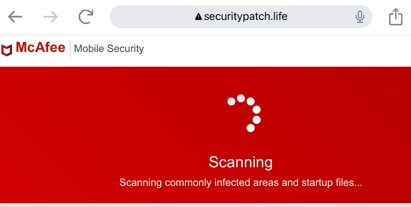
The goal of this page is to build awareness of scam websites that pose as antivirus companies.
To get the maximum value out of this page, you will want to also understand the pages below:
You might find that your web browser has opened a scam website because for example:
A scammer found a weakness in an advertising network a website owner uses.
A scammer found a weakness in a content management system that a website owner uses.
A website owner might even be in on a scam.
Scam websites that copy the look, feel, and logos of legitimate antivirus providers are among the frequent users of such techniques.
An antivirus themed scam website may display a warning that you have a virus and that you should do one or both of:
Call the phone number displayed by the scam website and provide a credit card.
Download software from the scam website.
I can't tell you whether you do or do not actually have a virus on your computer, but I can tell you that to take either of the two actions above would be a very bad idea.
My YouTube Short On A Fake McAfee Website
My YouTube short below goes over a website that is trying to fool people into thinking that it is related to the McAfee antivirus company.
I believe that the registration information may have changed since I made the video below.
Fake McAfee website
Conclusion
At the beginning of this page, I stated that the goal of this page is to make people aware of websites that pose as antivirus companies.
While, yes that is a goal, it is not the whole story.
The specific website the YouTube short went over was a case in which the scammer:
Used a technical exploit to direct the user's web browser to a scam website.
The scam website was designed to social engineer the user into downloading malware or calling the scammer.
Users often have difficulty grasping how completely evil scammers are.
I need you to understand that the website discussed in the video is merely one such example.